- Bare Board DRC for More Manufacturable PCBs
 Why manufacturability has to be checked before release Every PCB designer knows the gap between a layout that looks clean on screen and a board that is truly ready for fabrication. That is exactly where the Bare Board Analysis DRC… Read more: Bare Board DRC for More Manufacturable PCBs
 - Stencil Analysis for Higher PCB Manufacturing Quality
 Why Stencil Analysis matters in PCB manufacturing In PCB production, small details often determine whether a board performs reliably in the field. Stencil Analysis is a critical step for checking paste geometry early and reducing risk before defects reach the… Read more: Stencil Analysis for Higher PCB Manufacturing Quality
 - PCB 3D Export for Better ECAD and MCAD Collaboration
 When 2D is no longer enough PCB design does not end at the edge of the layout. As soon as the board has to fit into an enclosure, a module, or a mechanical assembly, the quality of ECAD-MCAD collaboration becomes… Read more: PCB 3D Export for Better ECAD and MCAD Collaboration
 - PCB Panelization Made Efficient with Panel Builder
 Panelization should not slow down fabrication Turning individual PCB designs into a production-ready panel is one of those tasks that can quietly consume far too much engineering time. Between spacing rules, rotations, fiducials, and mixed input data, panel creation often… Read more: PCB Panelization Made Efficient with Panel Builder
 - Bare Board Analysis DRC for Manufacturable PCB Designs
 Manufacturable PCB design starts with verification A PCB is only truly ready when it works electrically and can also be manufactured efficiently and reliably. That is exactly where PCB-Investigator’s Bare Board Analysis comes in: the integrated DRC helps teams assess… Read more: Bare Board Analysis DRC for Manufacturable PCB Designs
 - Bidirectional PDF Sync for Faster PCB Reviews
 When the layout and the PDF no longer match, errors follow In PCB development, alignment between layout, schematic, and documentation is critical. Once information in PDFs, comments, or revision states drifts apart, teams face misunderstandings, extra review cycles, and avoidable… Read more: Bidirectional PDF Sync for Faster PCB Reviews
 - DFT Preparation for Faster Test Program Creation
 DFT preparation without the extra loops If you prepare test programs for ICT or flying probe systems, you know how quickly access planning, coverage optimization, and machine export can consume engineering time. The DFT Preparation Plugin from PCB-Investigator is built… Read more: DFT Preparation for Faster Test Program Creation
 - Hazard Analysis for Safer PCB Layouts
 Find clearance risks before they become failures In PCB design, small spacing mistakes can turn into serious safety and reliability issues. The Hazard Analysis plug-in in PCB-Investigator helps you identify potential short-circuit areas, critical edge distances, and exposed copper in… Read more: Hazard Analysis for Safer PCB Layouts
 - Generate PCB Design Reports Faster with PCBI
 One report for all critical PCB data In PCB development and manufacturing, the quality of documentation is just as important as the quality of the design itself. The Design Report plug-in in PCB-Investigator automatically creates a clear overview of the… Read more: Generate PCB Design Reports Faster with PCBI
 - Component Analysis for Better PCB Manufacturing
 Why component analysis matters in PCB manufacturing Manufacturing issues in PCB design often show up late—during assembly, soldering, or final inspection, when fixing them becomes expensive. That is exactly where PCB-Investigator’s Component Analysis helps. The plug-in is designed to identify… Read more: Component Analysis for Better PCB Manufacturing
 - AOI Export for Precise PCB Inspection
 Precise AOI starts with the right export In PCB manufacturing, the quality of the data often determines how efficiently automated optical inspection performs. If CAD data, camera systems, and export settings are not aligned, analysis becomes slower than it should… Read more: AOI Export for Precise PCB Inspection
 - PCB-Investigator: Faster PCB Analysis for Engineers
 Why speed matters in PCB analysis In PCB development, the challenge is not only design quality, but also how quickly technical relationships can be understood. When engineers can review layouts, nets, and board structures efficiently, they save time and reduce… Read more: PCB-Investigator: Faster PCB Analysis for Engineers
 - Compare PCB Designs with Confidence: The Comparison Features in PCB-Investigator
 Changes are part of the development process for every printed circuit board. Components are moved, nets are adjusted, traces are modified, or test points are added. The key is to identify these changes reliably and assess them transparently during the… Read more: Compare PCB Designs with Confidence: The Comparison Features in PCB-Investigator
 - PDF Synchronization for Faster PCB Design Reviews
 Synchronize PCB layout and PDF documentation without manual checks In many PCB workflows, the schematic, layout, and PDF documentation live side by side—and that is exactly where time gets lost. Engineers end up cross-checking changes manually, searching for positions, and… Read more: PDF Synchronization for Faster PCB Design Reviews
 - Power Pin Wizard for Faster PCB Supply Reviews
 See supply pins instantly On complex boards, identifying the relevant power and ground connections can take longer than the actual review. The Power Pin Wizard in PCB-Investigator solves that problem by making power and ground pins visible directly in the… Read more: Power Pin Wizard for Faster PCB Supply Reviews
 - PCB-Investigator: Faster PCB Analysis for Engineers
 PCB analysis should not slow down product development In electronics engineering, time is always under pressure. When you need to inspect board data, verify layer structures, or review net relationships, you need a tool that combines technical depth with efficiency.… Read more: PCB-Investigator: Faster PCB Analysis for Engineers
 - PCB-Investigator License Systems: Which Model Fits?
 Why licensing matters as much as features In PCB and electronics workflows, software capability is only half the equation. The license model can have a direct impact on how efficiently teams work, how IT manages access, and how easily engineers… Read more: PCB-Investigator License Systems: Which Model Fits?
 - PCB Database Compare for Faster Design Reviews
 Track PCB changes before they become review problems In PCB development, the quality of the review process often depends on how quickly and reliably changes can be tracked. Between layout engineers, PCB developers, and reviewers, even small data differences can… Read more: PCB Database Compare for Faster Design Reviews
 - Component Analysis for Better PCB Manufacturability
 DFM starts with component analysis In PCB development, many manufacturing risks only become visible too late. That is exactly where PCB-Investigator’s Component Analysis comes in: it helps identify components early that may cause soldering, assembly, or production issues later on.… Read more: Component Analysis for Better PCB Manufacturability
 - Thermal and Current Simulation for PCBsDon’t guess the temperature of your PCB A PCB does not heat up based on current alone. Real temperature depends on geometry, layer stack, material properties, components, and the cooling environment. That is why simple calculations and generic online tools… Read more: Thermal and Current Simulation for PCBs
- Detect Tombstone Risk in PCB Design Early
 Why tombstoning still matters in modern SMT production The tombstone effect is one of those classic reflow defects that still catches teams by surprise. Small 2-pin SMT parts such as resistors and capacitors can partially or fully lift from one… Read more: Detect Tombstone Risk in PCB Design Early
 - Hazard Analysis for Safer PCB Design Reviews
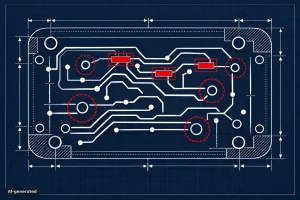 Catch clearance risks before they become failures In PCB design, electrical performance is only part of the job. Safety and compliance depend on clearances that are easy to miss when a layout gets dense, fast-moving, and highly complex. That is… Read more: Hazard Analysis for Safer PCB Design Reviews
 - PCB-Investigator for Faster PCB Analysis Workflows
 Why faster PCB analysis matters In electronics development, time lost in data review quickly turns into project risk. When layout data, stackups, and geometry need to be checked fast, teams need a tool that helps them analyze boards efficiently and… Read more: PCB-Investigator for Faster PCB Analysis Workflows
 - Electronic Parts Library: Find, Manage, and Integrate Components Faster
 Electronic component data is a crucial foundation for reliable PCB processes. At the same time, finding suitable components, verifying data, and adding missing or correcting inaccurate information can take a considerable amount of time in day-to-day work. The Electronic Parts… Read more: Electronic Parts Library: Find, Manage, and Integrate Components Faster
 - PCB-Investigator 30-Day Trial for PCB Engineers
 Evaluate PCB-Investigator in a real workflow Choosing PCB analysis software is rarely about checking one or two features. The real question is whether the tool supports your engineering process efficiently, reliably, and without compromise. That is exactly why PCB-Investigator offers… Read more: PCB-Investigator 30-Day Trial for PCB Engineers
 - AOI Analysis for Earlier PCB Testability Checks
 Catch AOI issues before production exposes them In PCB development, the real question is not whether a design looks correct, but whether it can actually be inspected in production. With Automated Optical Inspection (AOI), hidden weaknesses often appear only after… Read more: AOI Analysis for Earlier PCB Testability Checks
 - Component Report for Clear PCB Documentation
 Better component documentation for PCB teams In PCB development, quality is not defined by the layout alone. It also depends on how clearly the design is documented. The Component Report in PCB-Investigator helps you present component data in a structured… Read more: Component Report for Clear PCB Documentation
 - DFT Preparation for Faster PCB Test Programs
 Prepare test programs with less manual effort Creating test programs is often one of the most time-consuming steps in design-for-testability workflows. The DFT Preparation Plugin in PCB-Investigator helps engineers plan test accesses in a structured way, optimize coverage, and generate… Read more: DFT Preparation for Faster PCB Test Programs
 - Stencil Analysis for Better PCB Manufacturing Quality
 Stencil analysis is a critical step in PCB production Reliable PCB manufacturing starts long before assembly. One of the most important quality checks is stencil analysis, because solder paste geometry has a direct impact on print quality, assembly yield, and… Read more: Stencil Analysis for Better PCB Manufacturing Quality
 - Component Connection Analysis for PCB Design Reviews
 Why connection analysis matters in PCB engineering In complex PCB layouts, many issues are not caused by the circuit itself, but by the details of how components are connected. That is exactly where the Component Connection Analysis plug-in in PCB-Investigator… Read more: Component Connection Analysis for PCB Design Reviews
 - PCB Design Reports That Speed Up Handoff
 Stop losing time to avoidable PCB clarification loops In PCB development, the design itself is only half the story. The other half is documentation that helps everyone involved quickly understand the board, the constraints, and the manufacturing-relevant details. That is… Read more: PCB Design Reports That Speed Up Handoff
 - Precise PCB Distance Measurement for Engineering Teams
 Why distance measurement matters in PCB analysis In PCB design, a fraction of a millimeter can decide whether a board is manufacturable, mechanically safe, or electrically reliable. That is exactly where PCB-Investigator helps: it offers multiple distance measurement methods tailored… Read more: Precise PCB Distance Measurement for Engineering Teams
 - Test Coverage Report: See PCB Test Gaps Fast
 Maximum test coverage at a glance How confident are you that your assembly is truly tested? The Test Coverage Report in PCB-Investigator turns test data into an immediate visual overview, showing which components and nets are covered and where gaps… Read more: Test Coverage Report: See PCB Test Gaps Fast
 - IPC-2581 Import/Export for Better PCB Visibility
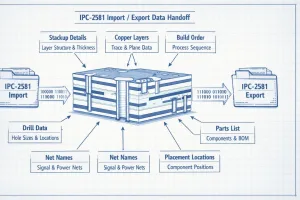 Why IPC-2581 still matters in PCB development In PCB data exchange, the real challenge is rarely the file format itself. The challenge is preserving enough design intent so engineering and manufacturing can work from the same reliable data set. That… Read more: IPC-2581 Import/Export for Better PCB Visibility
 - PCB-Investigator Script Engine for PCB Automation
 Automate repetitive PCB work instead of repeating it manually In PCB development, time is often lost not in the analysis itself, but in the repeated execution of the same tasks. That is exactly where the Script Engine in PCB-Investigator adds… Read more: PCB-Investigator Script Engine for PCB Automation
 - Bare Board Analysis DRC for manufacturable PCB designs
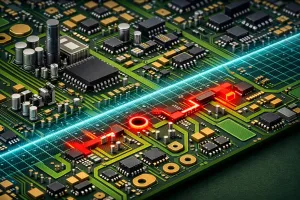 Catch manufacturability issues before they reach the fab In PCB development, functionality is only half the story. If a design cannot be manufactured reliably, it becomes a schedule risk, a cost driver, and a source of endless feedback from the… Read more: Bare Board Analysis DRC for manufacturable PCB designs
 - PCB-Investigator for Faster PCB Analysis Workflows
 PCB analysis should not depend on guesswork Anyone working with printed circuit boards knows the challenge: data must be reviewed quickly, layouts need to be understood accurately, and potential issues have to be identified before they become costly. This is… Read more: PCB-Investigator for Faster PCB Analysis Workflows
 - PCB Change Tracking Made Simple with Database Compare
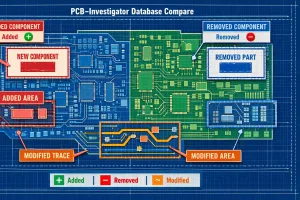 Faster PCB reviews start with better change tracking In PCB development, comparing data revisions is one of the most critical steps in the review process. Between layout designers and PCB developers, a clear and traceable change analysis often determines whether… Read more: PCB Change Tracking Made Simple with Database Compare
 - Fast PCB Impedance Checks for High-Speed Designs
 Why impedance is a first-class design parameter As signal speeds increase and transmission frequencies climb, PCB design becomes less forgiving. For high-speed traces, impedance is no longer something you check at the end; it has to be considered while the… Read more: Fast PCB Impedance Checks for High-Speed Designs
 - Part Expert: Real-Time Component Data for PCB Teams
 Component selection is no longer only a design task For PCB teams, the real challenge is not just choosing the right part technically. It is making sure that the part is available, affordable at the required volume, and realistic to… Read more: Part Expert: Real-Time Component Data for PCB Teams
 - PCB-Investigator: Faster Analysis for PCB Professionals
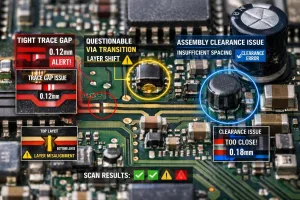 Why PCB analysis needs more than a visual check In electronics development, surface-level reviews are rarely enough. Issues in layout, stackup, manufacturing data, or assembly often remain hidden until they create delays, rework, or expensive surprises in production. That is… Read more: PCB-Investigator: Faster Analysis for PCB Professionals
 - BOM Expert for PCB Assembly Verification
 Clean BOM data is a manufacturing advantage In PCB development, the bill of materials is more than a spreadsheet. It is a critical data layer that influences sourcing, assembly readiness, and the quality of the digital product model. When AVL… Read more: BOM Expert for PCB Assembly Verification
 - AOI Analysis in PCB-Investigator for Better Testability
 Catch AOI issues before production starts Automatic Optical Inspection is essential in PCB manufacturing, but inspectability problems are often discovered too late. A component may block the camera view, hide individual pins, or force manual rework that could have been… Read more: AOI Analysis in PCB-Investigator for Better Testability
 - PCB-Investigator for Faster PCB Analysis
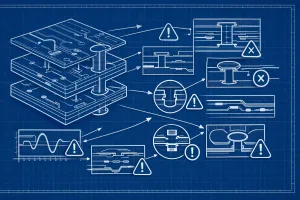 Understand PCB data faster and make better decisions In electronics development, time matters. As PCB designs become more complex, the need for reliable analysis, validation, and cross-functional collaboration grows with every project. PCB-Investigator is built to help engineers and PCB… Read more: PCB-Investigator for Faster PCB Analysis
 - 10 PCB-Investigator Features That Save You Time Every Day
 Anyone who works with PCB-Investigator on a regular basis quickly realizes that it’s not always the big features that make the biggest difference. More often, it’s the small shortcuts and everyday functions that become second nature—and quietly save you a… Read more: 10 PCB-Investigator Features That Save You Time Every Day
 - Streamline PCB Data Preparation with PCB-Investigator
 When the layout is nearly done, the real data prep starts In PCB work, a design is often not truly finished when routing is complete. Before analysis, release, or fabrication, teams still need to make targeted adjustments to ensure the… Read more: Streamline PCB Data Preparation with PCB-Investigator
 - Thermal Simulation for PCB Layout and Current Flow
 See thermal risk before the first prototype In PCB design, the most expensive problems are often the ones you only discover after fabrication. Local overheating, excessive current density, or unacceptable voltage drop can all remain hidden until late verification. PCB-Investigator… Read more: Thermal Simulation for PCB Layout and Current Flow
 - PCB Design Report for Faster Reviews and Handoffs
 Turn scattered PCB data into a clear design report In many PCB projects, the critical information is already there — it is just spread across CAD data, analysis results, and repeated questions from different teams. The Design Report in PCB-Investigator… Read more: PCB Design Report for Faster Reviews and Handoffs
 - Improve PCB Analysis with Net Groups
 Analyze smarter by grouping related nets In PCB development, speed and consistency matter just as much as accuracy. That is exactly where Net Groups help: they bundle logically related nets into a structured group, making complex design analysis easier to… Read more: Improve PCB Analysis with Net Groups
 - Tombstone DFM Analysis for Safer SMT Designs
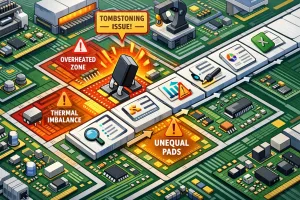 Catch tombstone risk before reflow does Tombstone defects are a classic SMT manufacturing issue: a small component lifts on one end and stands upright after reflow, typically affecting resistors or capacitors. The root cause is often uneven heating or an… Read more: Tombstone DFM Analysis for Safer SMT Designs


